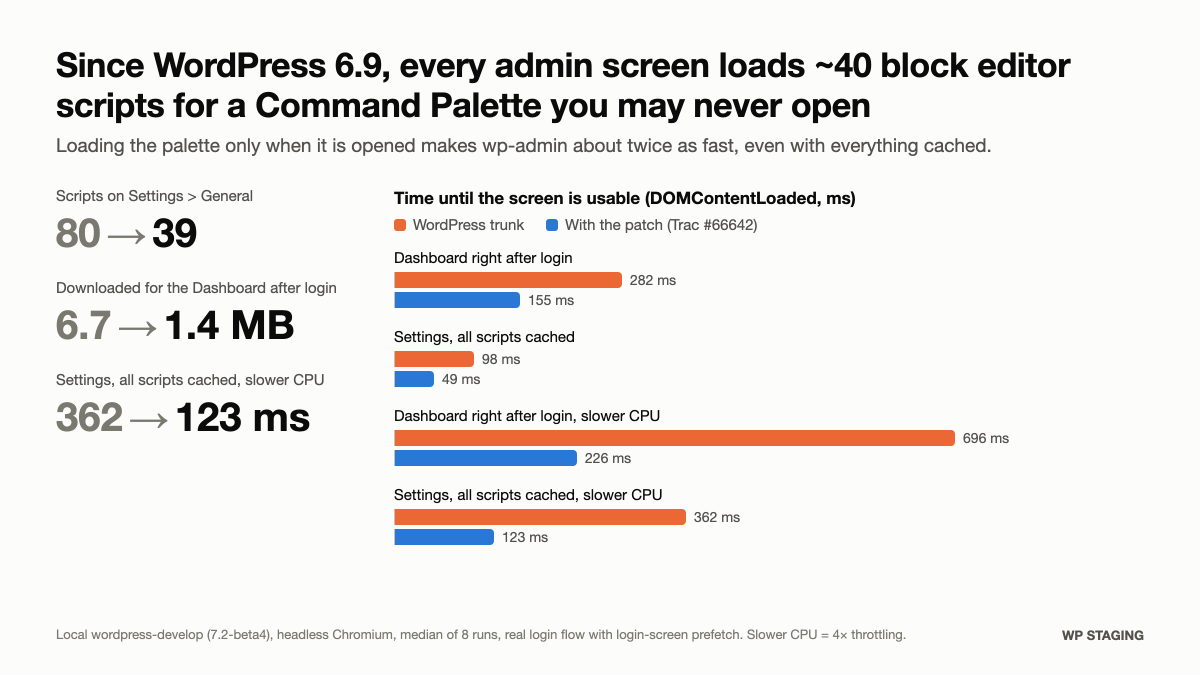
Every classic screen in wp-admin can be about twice as fast. Since WordPress 6.9, each of them loads about 40 block editor scripts before you can click anything: React, the component library, the block editor, the data layer and more. They are there for one feature, the Command Palette, the search box that opens with Ctrl/Cmd+K. The palette is useful. But it only needs those scripts once someone opens it, and on most admin page views nobody does.
For a while, wp-admin felt slower to me since 6.9, but I had never measured it. So I did, on a plugin admin page of a production site. 42 of its 59 scripts belonged to the palette. That was when I decided to fix it in WordPress core.
My patch loads the palette only when it is opened. The palette works exactly as before. Everything else gets faster.
The numbers
I measured Settings > General and the Dashboard on a local wordpress-develop install (7.2-beta4) with headless Chromium. Each value is the median of 8 runs through the real login flow, including the login screen’s asset prefetching.
| WordPress today | With the patch | |
|---|---|---|
| Scripts on Settings > General | 80 | 39 |
| Downloaded for the Dashboard after login | 6.7 MB | 1.4 MB |
| Dashboard right after login | 282 ms | 155 ms |
| Settings, every script already cached | 98 ms | 49 ms |
| Dashboard right after login, 4× slower CPU | 696 ms | 226 ms |
| Settings, every script cached, 4× slower CPU | 362 ms | 123 ms |
The times are DOMContentLoaded, the moment the page is ready to use.
The cached rows surprised me most. You might expect the browser cache to make the problem go away. It does not. The cache saves the download, but the browser still has to parse, compile and run every one of those scripts on every admin screen. On a slower laptop or an older phone, that is where the time goes.
You can also see it. In this recording, the Help button on Settings > General is clicked every 150 ms while the page loads. On the right, without the palette loaded up front, the Help panel opens after about 880 ms. On the left, WordPress today, the page does not react until about 1,740 ms.
What the patch does
- Admin screens get a 1.4 KB loader instead of the whole palette.
- The palette’s scripts and styles wait in an inert
<template>at the end of the page. - On the first Ctrl/Cmd+K or a click on the toolbar button, the loader adds them and opens the palette. The first open takes 100 to 250 ms. After that it opens instantly, as before.
- The post editor and the site editor load these scripts anyway, so they keep the palette up front, unchanged.
- Plugins that add their own commands get a new
enqueue_command_palette_assetsaction, so their commands load together with the palette. This came out of a review comment on the pull request. Thanks to everyone who tested it.
The change comes with PHPUnit and end-to-end tests and is up for review:
- Trac ticket: https://core.trac.wordpress.org/ticket/66642
- Pull request: https://github.com/WordPress/wordpress-develop/pull/15871
If you run WordPress sites, you can help. Test the patch with the WordPress Playground link in the pull request and leave your results on the ticket.
What comes next
The patch is a first step, not the end. Even with it, opening the Dashboard right after login still downloads 1.4 MB. That is a lot for an admin screen. It is what I will look at next, so wp-admin gets faster for everyone.
How do we keep WordPress fast?
This is not about blame. The Command Palette was built for good reasons by people who care about WordPress, and it went through review like any other change. It slipped through because nothing in the process measures what happens in the browser on admin screens.
WordPress core already runs performance tests on every pull request. For wp-admin, they measure how fast the server responds, not what the browser has to load and run afterwards. A change that adds dozens of scripts to every admin screen is invisible to them.
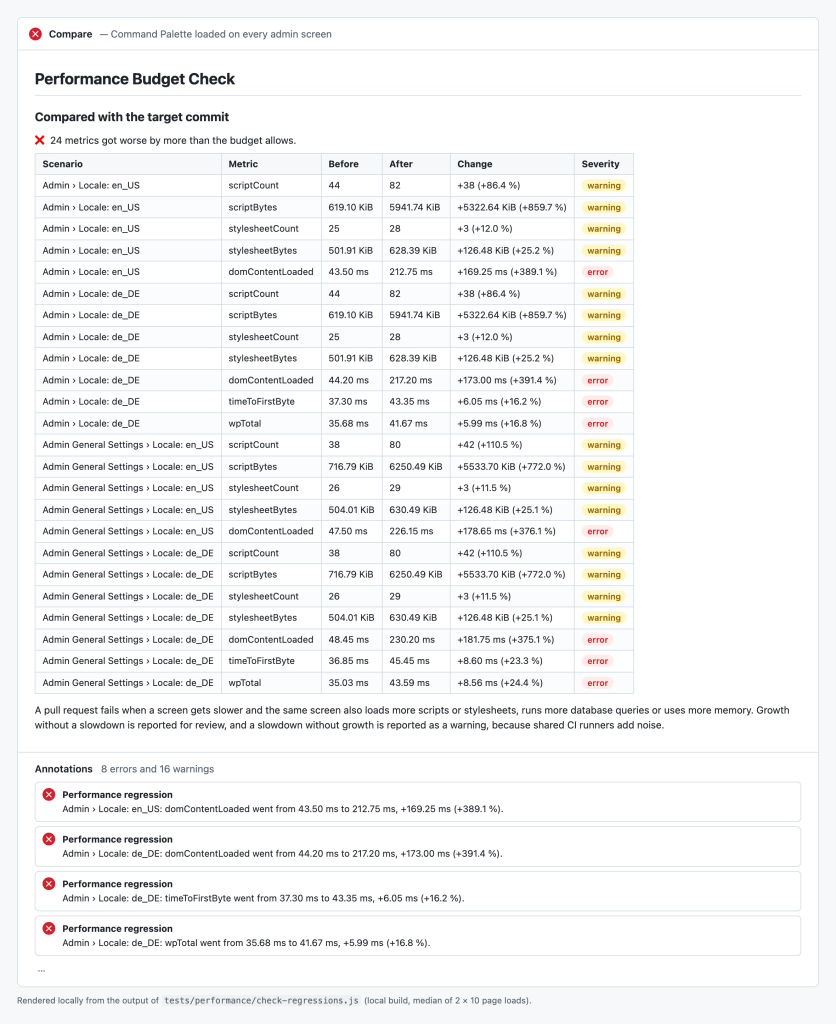
That gap is worth closing, so I proposed a change to core's performance tests. They also measure what the browser loads on wp-admin: the number and size of scripts and stylesheets, and when the page is ready. A budget check compares every pull request with its target. If a screen gets slower and the same screen also loads more code, the check fails. More code alone does not block a change, because features need code, but reviewers see the growth right away. A slowdown without any growth only warns, because timings vary on CI runners. If a cost is deliberate and reviewed, a label marks it as accepted, and the decision stays visible on the pull request. On the Command Palette change, the check fails on every measured screen.
The goal: no WordPress release should make WordPress slower.
The discussion is on the ticket, and the change is in a pull request:
- Trac ticket: https://core.trac.wordpress.org/ticket/66685
- Pull request: https://github.com/WordPress/wordpress-develop/pull/15957
WordPress runs a large part of the web. Every millisecond saved in wp-admin is saved for millions of people every day. Let’s make sure it only gets faster.