


Eine einfache Moeglichkeit, eine WP Staging Staging-Seite zu loeschen, ist unter Actions > Delete die Loeschung der gesamten Staging-Seite zu bestaetigen. Dadurch werden alle Dateien und die zugehoerigen Datenbanktabellen der Staging-Seite geloescht.
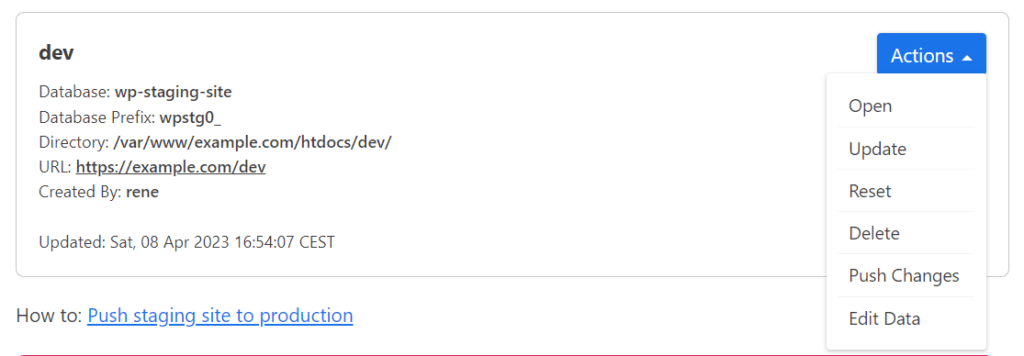
Manchmal kann es jedoch vorkommen, dass du keine Moeglichkeit hast, die Staging-Seite zu loeschen. Dies kann beispielsweise passieren, wenn du die WP Staging Einstellung „Remove Data on Uninstall“ aktiviert und WP Staging deinstalliert hast, bevor du die Staging-Seite ueber den vorgesehenen Loeschen-Button entfernt hast.
In that case, WP Staging loses the connection to the staging site, and you need to delete the testing site manually by the steps below.
The other reason you might not be able to delete a staging site is that the cloning process has been interrupted accidentally. In that case, data from an unfinished created website maybe still in the database and subfolder of your production site. For the moment, you need to delete that data manually as well.
Another reason for a missing staging site is when you restore your website with a prior backup before creating the site. So this backup would miss the connection data to the staging site.
Datenbankdaten in Tabellen loeschen
To delete the staging site, log in to your database with the software PHPMyAdmin or adminer and delete all tables which do not belong to one of your existing staging sites. For instance, that can be all tables that start with the prefix wpstg1_or wpstgbak_
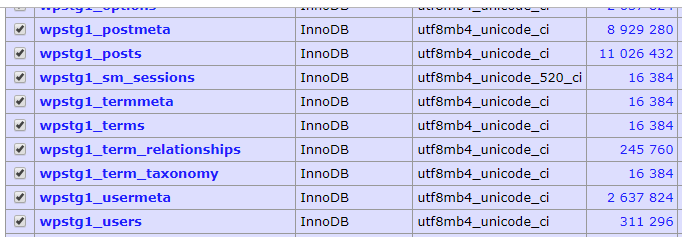
Anstatt alle Tabellen einzeln zu loeschen, kannst du die folgende SQL-Abfrage verwenden, die eine neue Abfrage erstellt, um alle Tabellen auf einmal zu loeschen:
SELECT CONCAT('DROP TABLE ', TABLE_SCHEMA, '.', TABLE_NAME, ';')
FROM INFORMATION_SCHEMA.TABLES
WHERE TABLE_NAME LIKE 'wpstg0_%'
or TABLE_NAME LIKE 'wpstgtmp_%'
or TABLE_NAME LIKE 'wpstg0_%'
or TABLE_NAME LIKE 'wpstg1_%'
or TABLE_NAME LIKE 'wpstg2_%'
or TABLE_NAME LIKE 'wpstg3_%'
or TABLE_NAME LIKE 'wpstg4_%'
or TABLE_NAME LIKE 'wpstg5_%'
or TABLE_NAME LIKE 'wpstg6_%'
or TABLE_NAME LIKE 'wpstg7_%'
or TABLE_NAME LIKE 'wpstg8_%'
or TABLE_NAME LIKE 'wpstg9_%'
or TABLE_NAME LIKE 'wpstg10_%'
or TABLE_NAME LIKE 'wpstg11_%'
or TABLE_NAME LIKE 'wpstg12_%'
or TABLE_NAME LIKE 'wpstg13_%'
or TABLE_NAME LIKE 'wpstg14_%'
;
Dies erstellt eine neue SQL-Abfrage, die alle Tabellen loescht, die mit den Praefixen wpstg0_ wpstg1_ und wpstg2_ beginnen
DROP TABLE DATABASENAME.wpstg1_options;
DROP TABLE DATABASENAME.wpstg1_postmeta;
DROP TABLE DATABASENAME.wpstg1_posts;
In Zukunft wird WP Staging in der Lage sein, diese ungenutzten Tabellen automatisch zu bereinigen, aber derzeit ist diese kleine zusaetzliche Arbeit noetig.
Dateien loeschen
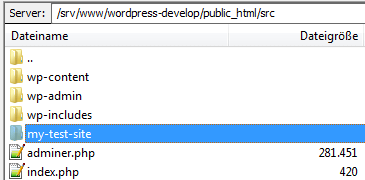
Also, check if the plugin has created a subfolder in the root path of your production site. You need to delete that folder as well:
Danach ist nichts mehr uebrig und die Staging-Seite wurde vollstaendig geloescht.